



















Bomber Man - Play Online Arcade Game for Free
Test your logic in Bomber Man, a challenging 70-level puzzle game. Strategically push crates to goals, avoid dead-ends, and create your own stages with the built-in Level Editor.
A Deep Dive into Explosive Puzzle Solving
The name might conjure up images of frantic arena battles, but this version of Bomber Man leans heavily into the "thinker" side of the genre. It’s a classic grid-based puzzler that values precision over twitch reflexes, feeling like a clever mix of Sokoban and tactical demolition. If you enjoy games that let you stare at a screen for five minutes, plan a 20-step sequence, and then execute it perfectly, this is right up your alley.
Game Intro
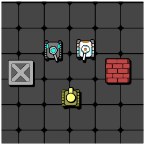
At its core, this is a game about spatial awareness. You’re dropped into various industrial or dungeon-like layouts filled with obstacles, and your only job is to get specific crates onto their designated target zones. It starts off deceptively simple—moving a box from point A to point B in an open room—but quickly evolves into a complex logistical nightmare.
The game ships with 70 built-in levels, and the difficulty curve is remarkably smooth. By the time you hit the mid-30s, you aren't just pushing boxes; you're managing tight corridors and permanent dead-ends where one wrong move means you have to restart the stage. It’s satisfyingly difficult without feeling unfair.
How to Play
The objective is straightforward: push every box in the level onto a marked goal tile. However, there’s a catch that defines the entire experience—you can only push, never pull.
If you shove a crate into a corner or against a flat wall without a way to get behind it, it’s stuck there forever. This means you have to visualize the entire path of the crate before you even touch it. You’ll find yourself constantly asking, "If I move this box now, will I block my path to the next one later?"
Once you’ve mastered the 70 included stages, the game opens up even more with a Level Editor. It’s surprisingly intuitive; you can drag and drop walls, goals, and crates to build your own brain-teasers. It adds a huge amount of replayability, especially if you like challenging friends to beat a "locally grown" impossible level.
Controls
The controls are stripped back to the basics so you can focus entirely on the puzzles. You don’t need a complex layout to get the job done here.
- Arrow Keys / WASD: Move your character up, down, left, and right.
- Space / Enter: Interact with menus or confirm level starts.
- R Key: Restart the level (you will be using this a lot when you accidentally corner a box).
- Mouse: Primarily used for navigating the Level Editor UI to place or remove objects.